Best AI Presentation Platforms for Custom Branding and Editable Drafts in 2026

Introduction
This article is for marketers, entrepreneurs, educators, and business professionals who need to create polished, on-brand presentations quickly and want to know which AI-powered platforms are worth their time. Whether you are building pitch decks, client proposals, training materials, or campaign briefings, the right tool can cut your production time significantly while keeping your visual identity consistent. After reading this, you will have a clear framework for evaluating your options and a concrete recommendation for where to start. No design background required.
Why AI Presentation Tools Have Changed the Game
Creating a strong presentation used to require either professional design skills or hours of wrestling with slide layouts. You would spend more time adjusting text boxes and hunting for images than actually refining your message. AI presentation platforms have changed that equation by generating structured drafts from simple prompts or existing documents, letting you focus on what you are trying to communicate rather than how to make it look good.
The current generation of tools goes well beyond slapping a template on your text. The best platforms can interpret context, suggest slide structure, source relevant visuals, apply brand guidelines automatically, and let multiple people collaborate in real time. For small businesses, in-house marketing teams, and solo operators, this is a meaningful shift in what is actually achievable without a creative agency.
That said, not every AI presentation tool is built the same way. Some prioritize speed and automation, others prioritize design flexibility, and a few try to do both. Understanding what actually matters for your specific use case is the starting point for making a smart choice.
10 Criteria for Evaluating AI Presentation Platforms
Before comparing specific platforms, it helps to have a consistent set of questions. Use this list to evaluate any tool you consider:
- Prompt-to-deck capability: Can the tool generate a full, structured slide deck from a text description or uploaded document, or does it only assist with individual slides?
- Brand customization depth: How thoroughly can you apply your own colors, fonts, and logos? Does the platform support a saved brand kit that applies automatically across new projects?
- Template quality and variety: Are the included templates professionally designe and genuinely adaptable? A large template library with poor quality is less valuable than a focused set with strong design.
- Editable output format: Can you download your finished presentation as a PowerPoint file or PDF? Can you continue editing in familiar tools like Microsoft PowerPoint or Google Slides after export?
- AI asset generation: Beyond the slide structure, does the platform help you generate or source images, icons, and graphics directly inside the tool? This matters when you do not have a ready media library.
- Collaboration features: Can multiple people review, comment, or co-edit simultaneously? For team environments, this determines whether the tool fits into existing workflows or creates a separate silo.
- Audience and tone controls: Can you specify who the presentation is for (executives, general audiences, technical reviewers) and adjust the level of detail accordingly? This determines whether the AI draft actually sounds like your communication, not a generic one.
- Free vs. paid access: What is available on a free plan, and where do the meaningful limits kick in? Some tools are genuinely useful for free, while others use free tiers primarily as previews.
- Integration with existing tools: Does the platform connect with tools you already use, such as cloud storage, PDF editors, or project management software? Workflow interruptions add friction even when the tool itself is strong.
- Learning curve and interface clarity: Can someone with no prior design experience open the tool and get to a usable draft within a few minutes? Complexity that requires onboarding investment a real cost for small teams.
Types of AI Presentation Platforms and What They Each Offer
Understanding the broader landscape makes it easier to narrow your options. AI presentation tools generally fall into a few categories, each with a distinct philosophy.
Fully Automated Generation Tools
These platforms are built around the idea that you should spend as little time as possible creating structure. You provide a topic or upload a source document, and the tool generates a complete draft with slides, copy, and visuals in place. The tradeoff is that automation can produce generic results when not carefully guided. The best tools in this category let you review and refine an outline before committing to the full design, which gives you meaningful control without requiring manual layout work.
When evaluating this type of platform, focus on how much editorial control you retain after generation. Can you adjust the outline before the slides are create? Can you regenerate individual slides without redoing the whole presentation? These small decisions have a large impact on whether the generated output actually fits your message or requires significant rework.
Template-First Platforms with AI Enhancements
Some platforms lead with a large library of professional templates and layer AI tools on top for things like image generation, text effects, and content suggestions. These are often the better choice for users who have a strong visual sense and want to maintain precise control over their design choices, but still want help with time-consuming tasks like sourcing assets or formatting.
The key question for this category is whether the AI features are genuinely integrated or feel tacked on. When AI image generation, text rephrasing, and content suggestions all live in separate menus and require different workflows, the time savings are minimal. Look for platforms where these features appear contextually, inside the editing experience, rather than requiring you to leave your workspace.
Document-to-Presentation Converters
A particularly useful category for business users is platforms that can ingest existing documents, such as PDFs, reports, or briefings, and generate a presentation from that source material. This eliminates the problem of manually translating written content into slide format, which is one of the most tedious parts of presentation production.
When evaluating this type of platform, test it with real documents from your workflow. Synthetic demos often use clean, well-structured source material that does not reflect the messy reality of most business documents. How the tool handles tables, footnotes, dense paragraphs, and charts embedded in a PDF will tell you more than any feature list.
Adobe Express: A Strong Option for Branded, AI-Generated Presentations
One platform worth a close look is the AI presentation maker from Adobe Express. It sits at an interesting intersection of automated generation and design-quality output, and it has several features that differentiate it from tools that treat presentation creation as a purely algorithmic problem.
The first standout feature is its document-ingestion capability. You can bring existing PDF files directly into the workflow through Adobe Acrobat integration, let the AI analyze the content, generate a structured outline, and then produce a complete presentation from that source material. For anyone who regularly turns written reports, proposals, or briefings into slide decks, this dramatically reduces the manual work involved.
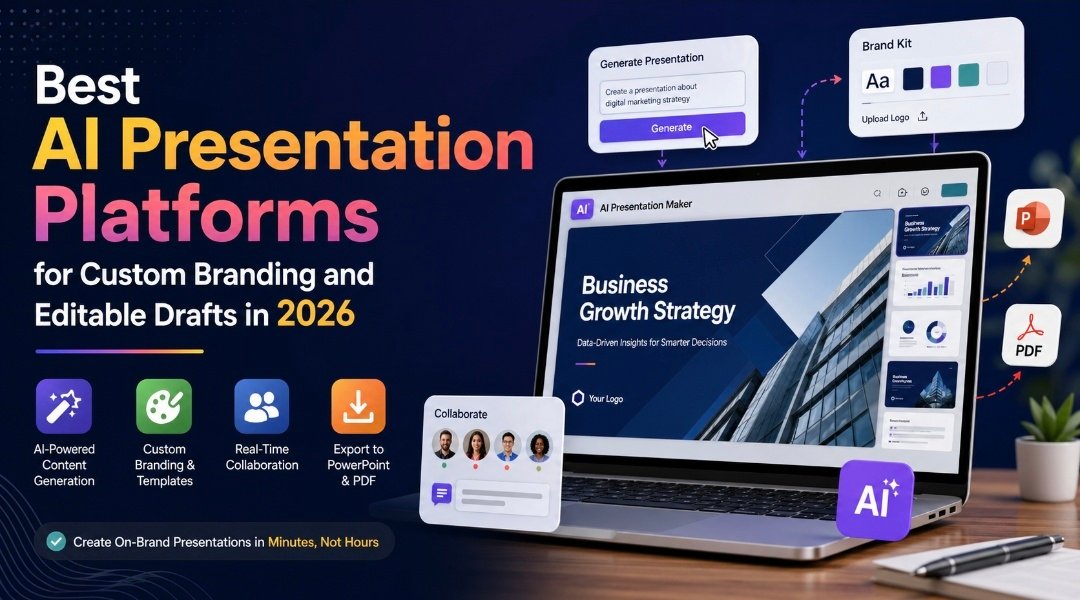
The second differentiator is the depth of brand customization. Adobe Express allows you to save a brand kit with your specific colors, fonts, and logos, which gets applied consistently across presentations. You can also upload your own images and videos, apply your own templates, and adjust visual elements with a full suite of design tools that go beyond simple drag-and-drop. For business users who need every deliverable to reflect their visual identity, this level of control matters.
Third, the collaboration and export options are built for professional use. Teams can co-edit in real time, leave comments, and finalize presentations together without any file transfer. When the project done, you can present directly from within Adobe Express, download as a PDF, or export as a Microsoft PowerPoint file, making it compatible with whatever environment your audience is working in.
Adobe Express has both a free plan and paid tiers, with the full AI generation features available on Premium and above. It is particularly well-suited for marketers, small business owners, and teams that need to produce on-brand content quickly without relying on a dedicated design resource.
How to Match a Platform to Your Actual Workflow
Even the best-reviewed platform is only valuable if it fits how you actually work. Here are a few practical filters to apply before committing to any tool:
- Volume and frequency: If you are creating one presentation per quarter, a premium subscription may not be justified. If you are producing decks weekly, the time savings on a paid plan will compound quickly.
- Source material: If your presentations always start from existing documents, prioritize platforms with strong ingestion and conversion capabilities. If you are usually starting from scratch with a topic in mind, prompt-to-deck generation is the more important feature.
- Audience expectations: Internal team presentations have different standards than investor pitches or client-facing proposals. Some tools are optimized for speed and informality, others for polished, boardroom-level output. Make sure the visual quality ceiling matches your highest-stakes use case.
- Team size: Solo creators can get by with personal-use plans and limited export options. Teams need real-time collaboration, comment functionality, and version control to avoid the chaos of emailing draft files back and forth.
- Brand sensitivity: If maintaining visual consistency is a business requirement, not just a preference, invest time in testing how well a platform applies and locks down brand elements. Some tools make it easy to drift from your guidelines accidentally.
FAQ
What is the difference between an AI presentation generator and a traditional presentation tool?
Traditional presentation tools like slideware software give you a blank canvas and expect you to fill it. You choose the layout, write the copy, source the images, and design each slide manually. An AI presentation generator removes most of that starting friction by interpreting your input, whether a text prompt or an uploaded document, and producing a structured draft that you can then refine. The key distinction is that you are editing and improving an existing draft rather than building from nothing, which is significantly faster for most business use cases. The quality of the draft varies by platform, so testing with your actual content is more informative than reading feature descriptions.
How important is brand customization when choosing an AI presentation platform?
For personal or informal use, brand customization may not matter much. For any business-facing context, it is one of the most important criteria. A presentation that uses the wrong font or an off-brand color palette signals carelessness to your audience, even when the content is strong. Look for platforms that support saved brand kits, allow custom font uploads, and apply your settings automatically to new projects rather than requiring manual reapplication each time. If you work within brand guidelines set by a parent organization, also check whether the platform allows you to restrict which design elements can be changed, so that team members cannot accidentally deviate from approved styles.For teams building out a brand system from scratch, a tool likeNotion can be useful for documenting and centralizing your brand guidelines before those standards get applied across presentation tools.
Can AI-generated presentations be used professionally without additional editing?
Rarely, and this is an important expectation to set. AI-generated drafts are strong starting points, not finished deliverables. The structure is usually solid, the layout is typically clean, and the visual elements are generally relevant. But the copy will often need to be tightened, the specifics of your business will need to be added, and the tone will need to be adjusted to match your voice. Think of the AI output as the equivalent of a capable first draft from a junior colleague: useful and time-saving, but requiring your judgment and editing before it goes to an audience.
What should I look for in collaboration features?
At minimum, look for the ability to share a link that gives others view or comment access without requiring them to create an account. Beyond that, genuine real-time co-editing is valuable for teams working under time pressure, and in-app commenting keeps feedback consolidated instead of scattered across email threads. Some platforms also support role-based access, which lets you control who can edit versus who can only view or comment. This matters in larger organizations where certain brand elements or slide structures need to stay locked. If your workflow involves handoffs between a content creator and a designer, also check whether the platform preserves formatting when a file is exported to PowerPoint or another format, since format degradation during export is a common frustration.
Is there a meaningful difference between free and paid plans for AI presentation tools?
Yes, and the gap is often larger than it appears from marketing descriptions. Free plans typically limit the number of AI-generated presentations you can create per month, restrict access to premium templates, and exclude the brand kit and advanced collaboration features that are most useful for professional work. For occasional, low-stakes use, a free plan may be sufficient. For any recurring business use, the limitations on AI generation volume and brand customization tend to make a paid plan necessary fairly quickly. The most useful way to evaluate this is to test the free plan with a real project under realistic time pressure, rather than a casual test, to see where the friction points actually appear before committing to a subscription.
Conclusion
AI presentation platforms have matured significantly, and the best ones now offer a genuine alternative to starting every deck from scratch. The right choice depends on how you work, what your output needs to look like, and how much control you need over the final product. Using the ten criteria outlined in this article, you can evaluate any platform on a consistent basis rather than being swayed by features that may not apply to your actual workflow.
If you need a tool that combines automated generation with strong branding controls and professional export options, Adobe Express is a solid place to start. Its document ingestion, brand kit support, and real-time collaboration features make it especially practical for business and marketing use cases. Whatever you choose, prioritize testing with real content from your own workflow. The best presentation tool is the one that consistently produces output you can actually use.